Skills & Concepts You'll Gain
- How a flame sensor detects infrared light from fire
- How to use digital and analog sensor readings together
- How to trigger buzzer alarms for safety systems
- How to build real-world safety and alert systems
- Foundation for home security, industrial safety, and IoT projects
Tech Used: Arduino UNO, Flame Sensor Module, Active Buzzer, Red LED, Arduino IDE
Components Needed
- Arduino UNO
- 1x Flame Sensor Module
- 1x Active Buzzer
- 1x Red LED + 220Ω Resistor
- Breadboard
- Jumper Wires
- USB Cable
Software Required
- Arduino IDE
Step 1
Understand the Flame Sensor
The flame sensor detects infrared (IR) light that fire produces. It has a small IR receiver that is sensitive to the wavelength of fire light.
The module has 3 pins:
- VCC → 5V on Arduino
- GND → GND on Arduino
- DO (Digital Output) → Pin 7 on Arduino - gives LOW when fire is detected, HIGH when no fire
The flame sensor output is inverted - it gives LOW (0) when fire IS detected and HIGH (1) when there is NO fire. Keep this in mind when writing the code!
Step 2
Wire the Circuit
- Flame Sensor: VCC → 5V, GND → GND, DO → Pin 7
- Red LED: Positive leg → Pin 6 (via 220Ω resistor), Negative leg → GND
- Buzzer: Positive (+) → Pin 8, Negative (-) → GND
Wiring Diagram
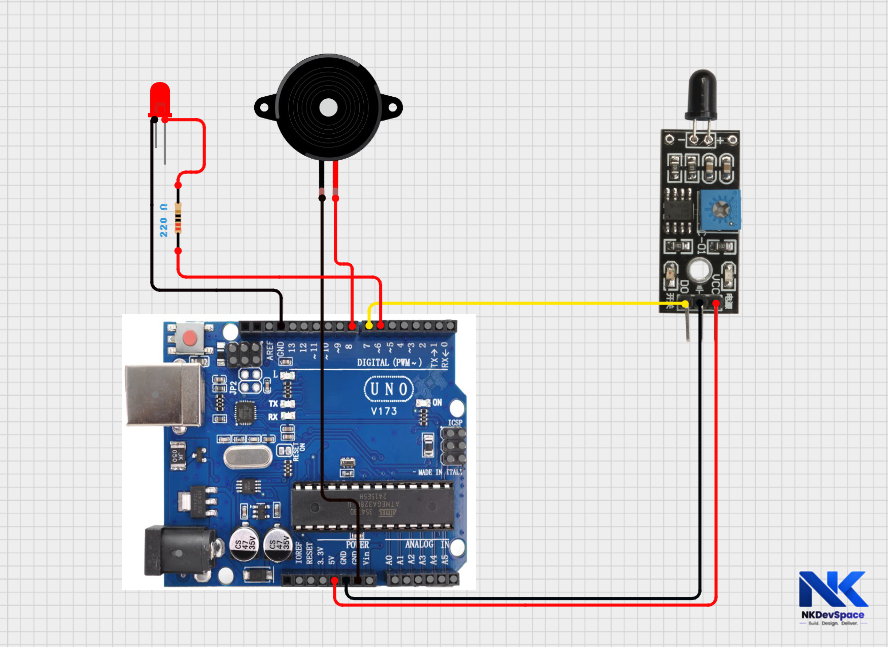
Keep the flame sensor away from direct sunlight and strong light sources, as they can cause false fire detection due to infrared interference.
Step 3
Write the Code by opening Arduino UNO
fire_detection.ino
// Fire Detection & Alarm - NKDevSpace Tutorial

const int flameSensor = 7;
const int redLED      = 6;
const int buzzerPin   = 8;

void setup() {
  pinMode(flameSensor, INPUT);
  pinMode(redLED, OUTPUT);
  pinMode(buzzerPin, OUTPUT);
  Serial.begin(9600);
  Serial.println("Fire Detection System Ready!");
}

void loop() {
  int flameStatus = digitalRead(flameSensor);

  // Flame sensor gives LOW when fire is detected
  if (flameStatus == LOW) {
    Serial.println("🔥 FIRE DETECTED! ALARM ON!");
    digitalWrite(redLED, HIGH);   // Red LED ON
    tone(buzzerPin, 2000);        // Buzzer alarm at 2000 Hz
  } else {
    Serial.println("✅ No fire. All safe.");
    digitalWrite(redLED, LOW);    // Red LED OFF
    noTone(buzzerPin);            // Buzzer OFF
  }

  delay(500);  // Check every 0.5 seconds
}
Step 4
Code Explanation
digitalRead(flameSensor)Reads the flame sensor pin. It returns either 0 (LOW) or 1 (HIGH). Since the sensor is inverted, LOW means fire detected.
if (flameStatus == LOW)This checks if fire is detected. Remember - the sensor gives LOW when it sees fire. So we check for LOW, not HIGH. This is the inverted logic of the sensor.
tone(buzzerPin, 2000)Activates the buzzer at 2000 Hz - a high-pitched alarm sound. You can change the frequency to make it sound different. noTone() silences it.
delay(500)The system checks for fire every 500 milliseconds (0.5 seconds). This is fast enough to detect fire quickly without overloading the Arduino.
Step 5
Test the Project
- Make sure your Arduino Uno is connected to your laptop using a USB cable
- If not already selected, choose the correct settings:
- Go to Tools → Board → Arduino AVR Boards → Arduino Uno
- Go to Tools → Port → COM X(COM 3, COM4, ...) (Arduino Uno)
- Open Tools → Serial Monitor
- Set the baud rate to 9600
- You should see the message "No fire. All safe." repeating every 0.5 seconds
- Check that the LED is OFF and the buzzer is silent in normal condition
- Now carefully bring a lit candle or lighter near the flame sensor (keep safe distance)
- When fire is detected:
- Red LED turns ON
- Buzzer starts making sound
- Serial Monitor shows Fire detected
- Move the flame away from the sensor
- The system should return to normal:
- LED turns OFF
- Buzzer stops
- Message changes back to "No fire. All safe."
Safety first! Keep the flame at least 10-15 cm away and never leave it unattended.
Step 6
Try It Yourself - Challenges
- Make the buzzer beep in a pattern (ON 200ms, OFF 200ms) instead of continuous sound
- Add a green LED that stays ON when there is no fire (safe indicator)
- Add a smoke sensor (MQ-2) alongside the flame sensor for better detection
- Send an alert message via GSM module to a phone number when fire is detected