Components Needed
- Arduino UNO
- 1x LED (any color)
- 1x 220Ω Resistor
- Breadboard
- Jumper Wires
- USB Cable
Software Required
- Arduino IDE (free download)
- USB Driver for Arduino
Step 1
Install Arduino IDE
Download and install the Arduino IDE from the official website.
- Go to arduino.cc/en/software
- Download the version for your OS (Windows / Mac / Linux)
- Install it and open the IDE
- Connect your Arduino UNO via USB - the IDE should detect it automatically
Go to Tools → Board and select Arduino UNO. Then go to Tools → Port and select the COM port your Arduino is connected to.
Step 2
Wire the Circuit
Connect the LED and resistor to the Arduino on a breadboard.
- Place the LED on the breadboard - note the longer leg is positive (+)
- Connect the positive leg of the LED to Pin 13 on Arduino via a jumper wire
- Connect a 220Ω resistor between the negative leg of the LED and the GND pin on Arduino
Wiring Diagram
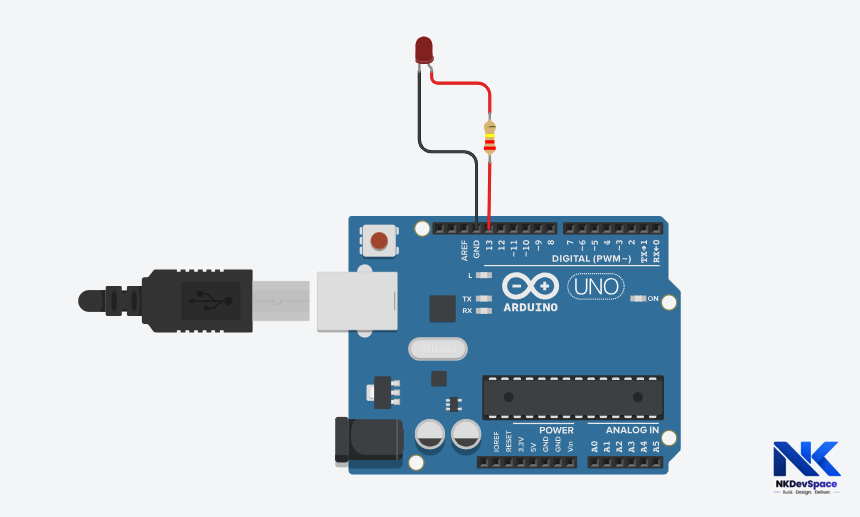
Always use a resistor with an LED - without it, too much current flows and the LED will burn out instantly.
Step 3
Write the Code by opening Arduino UNO
Open Arduino IDE, create a new sketch, and type the following code:
sketch.ino
// Blink LED - NKDevSpace Tutorial

void setup() {
  pinMode(13, OUTPUT);  // Set pin 13 as output
}

void loop() {
  digitalWrite(13, HIGH);  // Turn LED ON
  delay(1000);              // Wait 1 second
  digitalWrite(13, LOW);   // Turn LED OFF
  delay(1000);              // Wait 1 second
}
Step 4
Upload & Run
- Click the Upload button (right arrow icon) in Arduino IDE
- Wait for "Done uploading" message at the bottom
- Your LED should now blink ON and OFF every 1 second!
Try changing the delay(1000) value - smaller number = faster blink, larger = slower. Try delay(200) for a fast blink!
Step 5
Try It Yourself - Challenges
Now that it works, try these to level up:
- Make the LED blink 3 times fast, then pause for 2 seconds
- Add a second LED on Pin 12 and alternate the blinking
- Use the Serial Monitor to print "ON" and "OFF" messages