Skills & Concepts You'll Gain
- How to use an ultrasonic sensor to measure distance/water level
- How to trigger a buzzer for audio alerts
- How to use multiple LEDs to show different status levels
- How to build threshold-based alert systems
- Foundation for tank monitoring, flood detection, and smart home projects
Tech/components Used: Arduino UNO, HC-SR04 Ultrasonic Sensor, Buzzer, LEDs, Arduino IDE
Components Needed
- Arduino UNO
- 1x HC-SR04 Ultrasonic Sensor
- 1x Buzzer (active)
- 1x Red LED + 220Ω Resistor
- 1x Green LED + 220Ω Resistor
- Breadboard
- Jumper Wires
- USB Cable
Software Required
- Arduino IDE
Step 1
How This Project Works
The ultrasonic sensor is placed at the top of the water tank, facing downward. It measures the distance from the sensor to the water surface.
- Large distance = water level is LOW (tank is nearly empty)
- Small distance = water level is HIGH (tank is nearly full)
Based on the distance, we light up different LEDs and sound the buzzer to alert the user.
Step 2
Wire the Circuit
- HC-SR04: VCC → 5V, GND → GND, TRIG → Pin 9, ECHO → Pin 10
- Green LED (safe level): Positive leg → Pin 4, Negative leg → GND via 220Ω resistor
- Red LED (alert level): Positive leg → Pin 5, Negative leg → GND via 220Ω resistor
- Buzzer: Positive (+) → Pin 8, Negative (-) → GND
Wiring Diagram
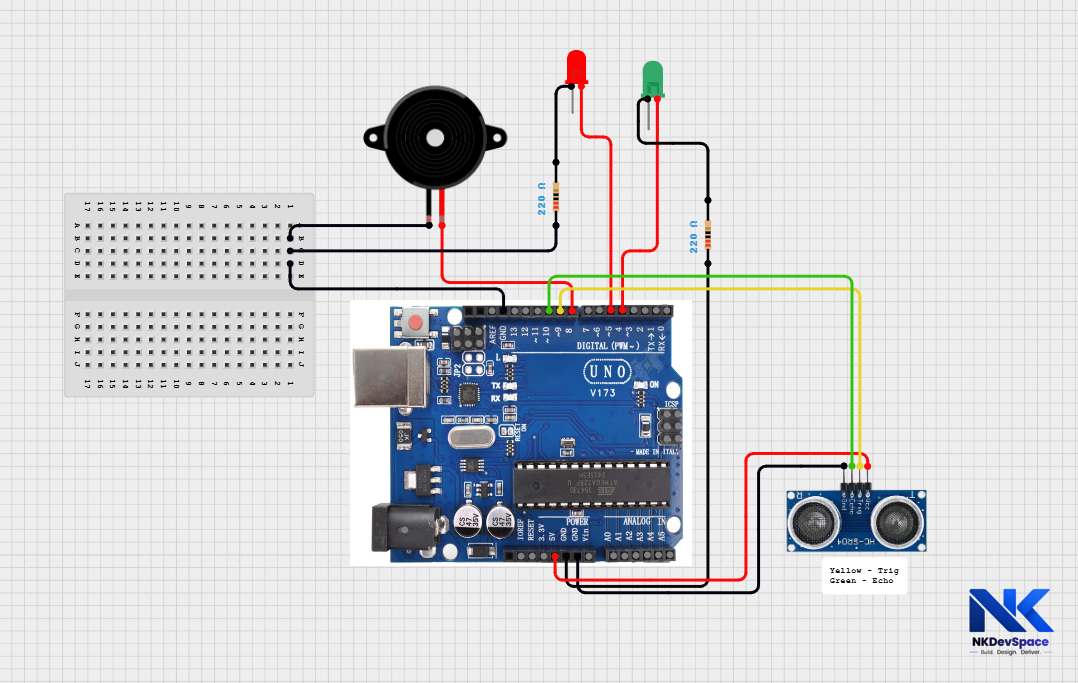
Mount the ultrasonic sensor at the very top of the tank, pointing straight down. Make sure it doesn't touch the water.
Step 3
Write the Code by opening Arduino UNO
water_level.ino
// Water Level Alert - NKDevSpace Tutorial

const int trigPin   = 9;
const int echoPin   = 10;
const int greenLED  = 4;
const int redLED    = 5;
const int buzzerPin = 8;

// Adjust these based on your tank height (in cm)
const int fullLevel  = 5;   // Tank is FULL when distance < 5 cm
const int emptyLevel = 25;  // Tank is EMPTY when distance > 25 cm

long getDistance() {
  digitalWrite(trigPin, LOW);
  delayMicroseconds(2);
  digitalWrite(trigPin, HIGH);
  delayMicroseconds(10);
  digitalWrite(trigPin, LOW);
  long duration = pulseIn(echoPin, HIGH);
  return duration * 0.034 / 2;
}

void setup() {
  pinMode(trigPin, OUTPUT);
  pinMode(echoPin, INPUT);
  pinMode(greenLED, OUTPUT);
  pinMode(redLED, OUTPUT);
  pinMode(buzzerPin, OUTPUT);
  Serial.begin(9600);
}

void loop() {
  long distance = getDistance();

  Serial.print("Distance to water: ");
  Serial.print(distance);
  Serial.println(" cm");

  if (distance <= fullLevel) {
    // Tank is FULL - Red alert
    Serial.println("ALERT: Tank is FULL!");
    digitalWrite(greenLED, LOW);
    digitalWrite(redLED, HIGH);
    tone(buzzerPin, 1000);  // Buzzer ON at 1000 Hz
  }
  else if (distance >= emptyLevel) {
    // Tank is EMPTY - Red alert
    Serial.println("ALERT: Tank is EMPTY!");
    digitalWrite(greenLED, LOW);
    digitalWrite(redLED, HIGH);
    tone(buzzerPin, 500);   // Buzzer ON at 500 Hz
  }
  else {
    // Water level is NORMAL - Green light
    Serial.println("Water level: Normal");
    digitalWrite(greenLED, HIGH);
    digitalWrite(redLED, LOW);
    noTone(buzzerPin);      // Buzzer OFF
  }

  delay(1000);
}
Step 4
Code Explanation
fullLevel = 5, emptyLevel = 25These are the distance thresholds in centimeters. If the sensor reads less than 5 cm, the tank is full. More than 25 cm means it's empty. Change these values based on your actual tank height.
tone(buzzerPin, 1000)Makes the buzzer produce a sound at 1000 Hz frequency. Higher number = higher pitch sound. noTone() stops the buzzer.
distance <= fullLevelWhen the water is very close to the sensor (small distance), the tank is full. We alert with red LED and buzzer to stop the pump or inform the user.
Step 5
Test the Project
- Make sure your Arduino Uno is connected to your laptop using a USB cable
- If not already selected, set the correct options:
- Go to Tools → Board → Arduino AVR Boards → Arduino Uno
- Go to Tools → Port → COM X(COM 3, COM4, ...)(Arduino Uno)
- Upload the code if not already uploaded
- Open Tools → Serial Monitor and set baud rate to 9600
- Hold your hand close to the sensor (within 5 cm):
- Red LED should turn ON
- Buzzer should activate (simulating full tank)
- Move your hand far away (beyond 25 cm):
- Red LED and buzzer should activate again (simulating empty tank)
- Hold your hand at a middle distance:
- Green LED should glow (normal water level)
Test using your hand before placing the system in a real tank. You can adjust the fullLevel and emptyLevel values in the code based on your tank size.
Step 6
Try It Yourself - Challenges
- Add a yellow LED for medium water level warning
- Display the water level as a percentage on Serial Monitor
- Automatically turn ON a relay/pump when tank is empty
- Show water level on an LCD display